
Description
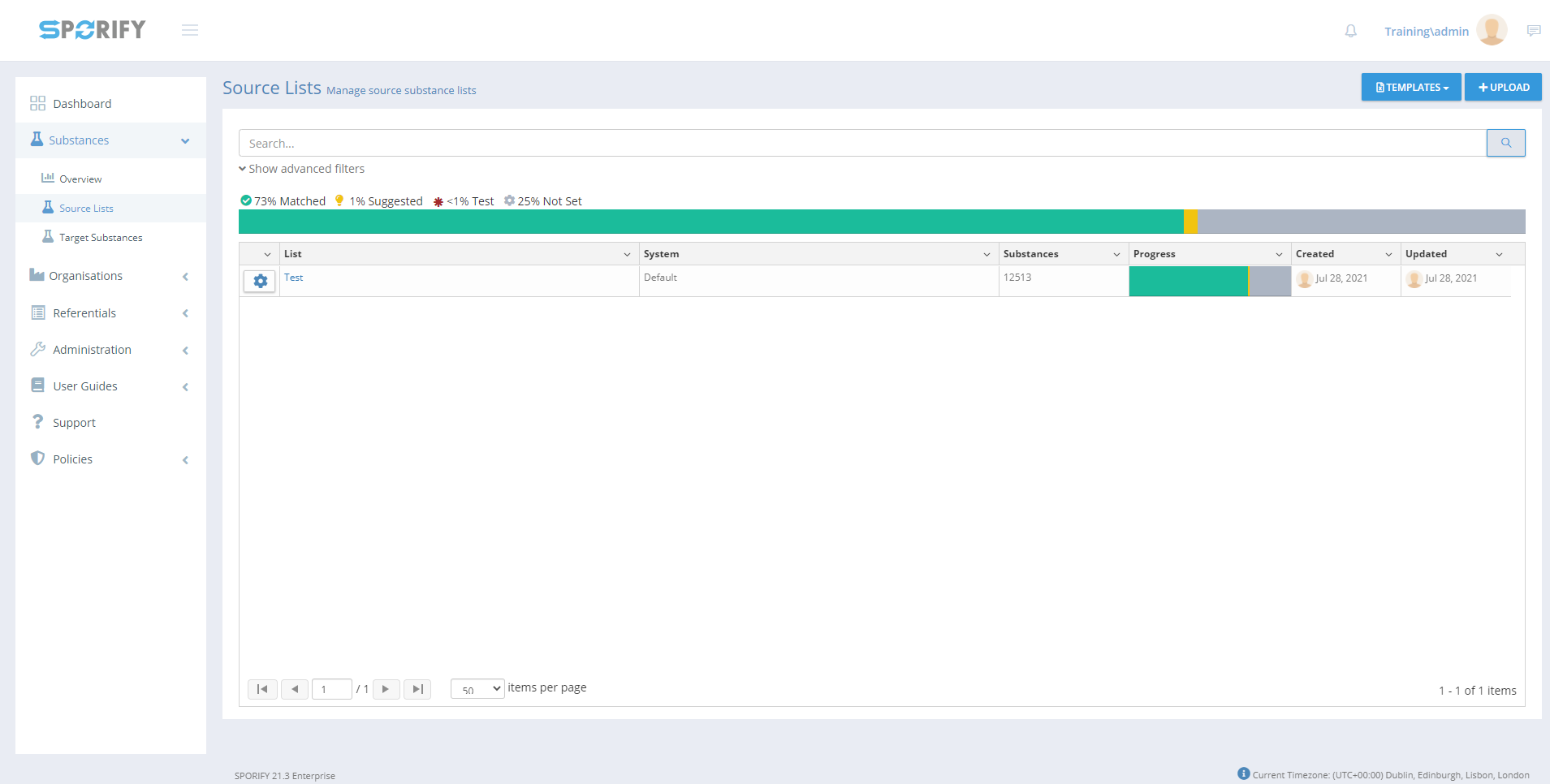
In SPORIFY, users can view and manage Substances Source Lists. They can carry out the following actions in this area:
-
Search lists
-
Filter lists
-
Download templates
-
Upload lists
-
View Substances
-
Edit lists
-
Update lists
-
Delete lists
-
Export lists
-
Add Substances
Procedure
-
Login to SPORIFY.
-
Select Substances on the navigation menu.
-
Click Source Lists.
-
Substances Source Lists can be:
-
Searched using the search bar
-
Filtered using the advanced filters functionality
-
Uploaded using the Upload button
-
Viewed by clicking the cog icon, then View Substances
-
Edited by clicking the cog icon, then Edit
-
Updated by clicking the cog icon, then Update
-
Deleted by clicking the cog icon, then Delete
-
Exported by clicking the Export button
-
-
Substances can be added to source lists using the Add Substance button.
-
Source List templates can be downloaded using the Templates button
-
Select CSV or Excel
-
The template will then download directly to the user’s device
-
Note: Further details about the listed functionalities can be found in other related documentation.
Acceptance Criteria
To succeed, the user must be able to access and manage source lists via the Source Lists screen.
-
Verify that the Source Lists screen can be accessed via the navigation menu.
-
Verify that the user can download CSV and Excel templates via this screen.
-
Verify that the user can search, filter, upload, edit, delete, update and export lists.
-
Verify that the user can View Substances and Add Substances to lists.
Related / Alternative Procedure
N/A
GUI Specification
Purpose of these GUI elements.
The purpose of these GUI elements is to enable the user to view and manage their Substances Source Lists.
Mockups and Screenshots
GUI Elements
|
Mockup of GUI Element |
Title |
Default |
Enabled |
Type |
Data |
Description |
|---|---|---|---|---|---|---|
|
Source Lists |
N/A |
Always |
Menu item |
String |
Navigates to Substances Source Lists |
Available Actions And Commands
|
Mockup of GUI Element |
Title |
Shortcut |
Enabled |
Type |
Role/Permission |
Action |
Tooltip |
Audit Trail |
|---|
Related Documentation and Sources
-
N/A