
Description
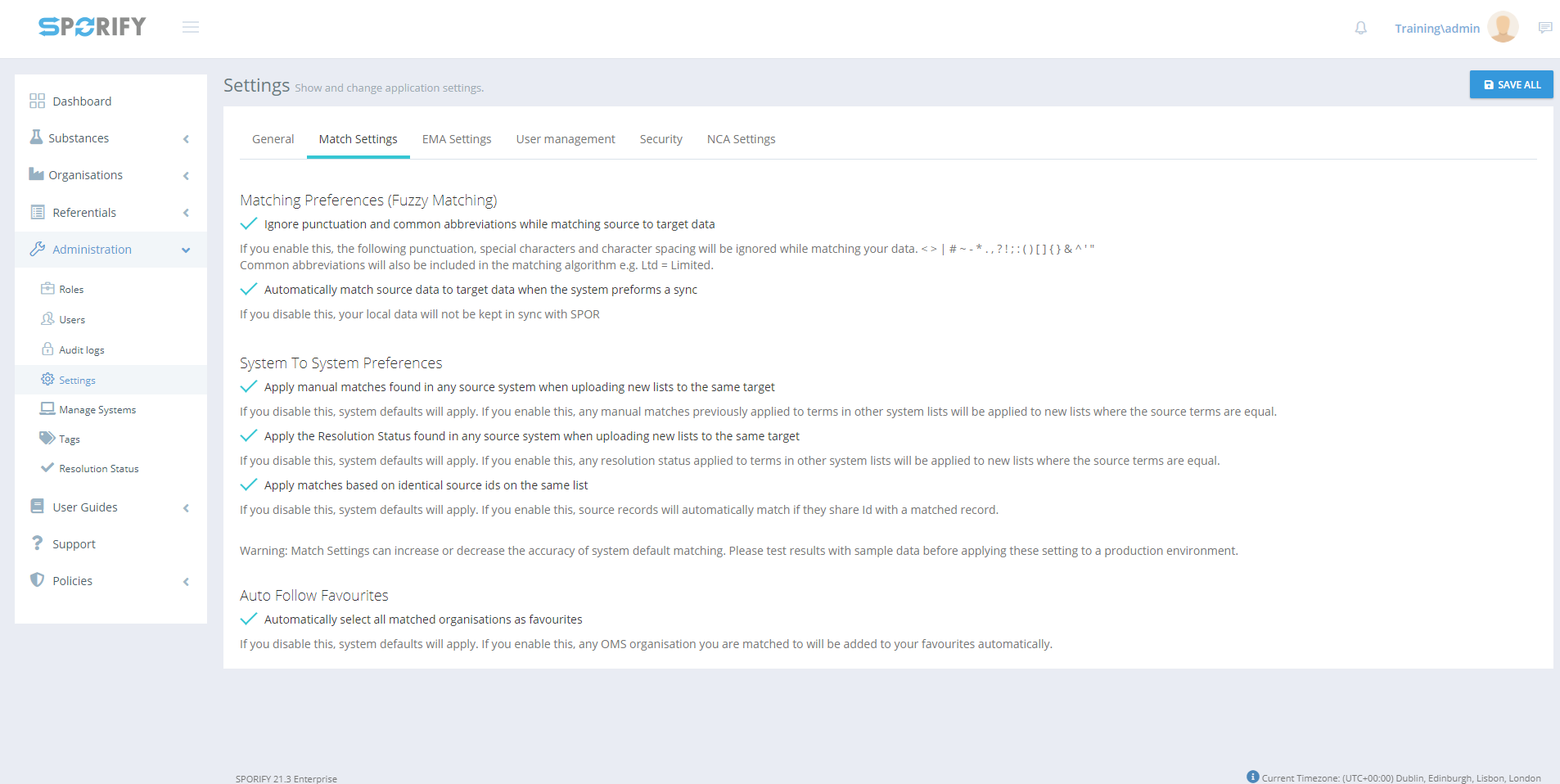
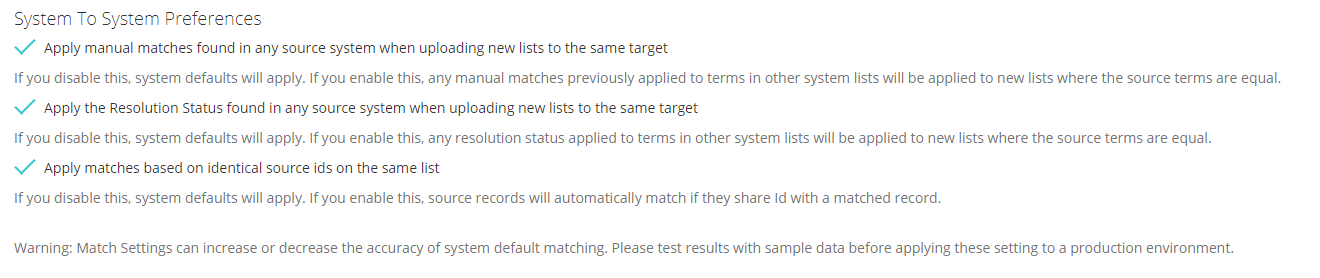
System To System Preferences is a sub-section of Match Settings in SPORIFY Administration Settings. It allows the administrator to set three specific preferences related to system to system matching, which are as follows:
-
Apply manual matches found in any source system when uploading new lists to the same target
-
Note: This setting applies to the Referentials and Organisations domains only.
-
-
Apply the Resolution Status found in any source system when uploading new lists to the same target
-
Note: This setting applies to the Referentials and Organisations domains only.
-
-
Apply matches based on identical source ids on the same list
-
Note: This setting applies to the Substances domain only.
-
Match Settings can increase or decrease the accuracy of system default matching, so results should be tested with sample data before applying these settings to a production environment.
Procedure
-
Login to SPORIFY.
-
Click Administration on the navigation menu.
-
Click Settings.
-
Select the Match Settings tab.
-
Below the System To System Preferences heading, there are checkboxes with the following names:
-
Apply manual matches found in any source system when uploading new lists to the same target
-
Check this checkbox to apply manual matches found in any source system when uploading new lists to the same target.
-
Uncheck this checkbox to prevent the application of manual matches found in any source system when uploading new lists to the same target.
-
If this is disabled, system defaults will apply. If this is enabled, any manual matches previously applied to terms in other system lists will be applied to new lists where the source terms are equal.
-
-
Apply the Resolution Status found in any source system when uploading new lists to the same target
-
Check this checkbox to apply the Resolution Status found in any source system when uploading new lists to the same target.
-
Uncheck this checkbox to prevent the application of the Resolution Status found in any source system when uploading new lists to the same target.
-
If this is disabled, system defaults will apply. If this is enabled, any resolution status applied to terms in other system lists will be applied to new lists where the source terms are equal.
-
-
Apply matches based on identical source ids on the same list
-
Check this checkbox to apply matches based on identical source ids on the same list.
-
Uncheck this checkbox to prevent the application of matches based on identical source ids on the same list.
-
If this is disabled, system defaults will apply. If this is enabled, source records will automatically match if they share Id with a matched record.
-
-
-
Click Save All to save system to system preferences.
Acceptance Criteria
To succeed, the administrator must be able to set and change system to system preferences within SPORIFY.
-
Verify that system to system preferences can be accessed via the Match Setting tab in SPORIFY Administration Settings.
-
Verify that the administrator can set the specific preferences outlined above in this area.
Related / Alternative Procedure
N/A
GUI Specification
Purpose of these GUI elements.
The purpose of these GUI elements is to allow the administrator to set a variety of system to system preferences within SPORIFY.
Mockups and Screenshots
GUI Elements
|
Mockup of GUI Element |
Title |
Default |
Enabled |
Type |
Data |
Description |
|---|---|---|---|---|---|---|

|
Apply manual matches found in any source system when uploading new lists to the same target |
True |
Always |
Checkbox |
Boolean |
Click to enable or disable the option. |

|
Apply the Resolution Status found in any source system when uploading new lists to the same target |
True |
Always |
Checkbox |
Boolean |
Click to enable or disable the option. |

|
Apply matches based on identical source ids on the same list |
True |
Always |
Checkbox |
Boolean |
Click to enable or disable the option. |

|
Administration |
N/A |
When the user has administrative permissions |
Expandable menu item |
String |
Clicking Administration reveals all available Administration sub-menu items |

|
Settings |
N/A |
When the administrator has the relevant permissions |
Menu item |
String |
Navigates to the Settings screen |

|
Match Settings |
N/A |
When administrator has the relevant permissions |
Tab |
String |
Navigates to Match Settings |
Available Actions And Commands
|
Mockup of GUI Element |
Title |
Shortcut |
Enabled |
Type |
Role/Permission |
Action |
Tooltip |
Audit Trail |
|---|---|---|---|---|---|---|---|---|

|
Save All |
N/A |
Always |
Button |
Administration - Settings |
Saves system to system preferences |
N/A |
Yes |
Related Documentation and Sources
N/A
Specification References