
Description
SPORIFY’s Change log feature allows administrators to retrieve insert, update and delete events of their tenant’s users.
Change logs can be viewed and managed via the Change Logs area of SPORIFY Administration.
-
Change logs can be filtered.
-
Change logs can be exported to Excel.
Procedure
-
Login to SPORIFY.
-
Select Administration on the navigation menu.
-
Select Change Logs.
-
Here, the Change Logs grid is presented, which contains the following columns:
-
Timestamp
-
Username
-
Full Name
-
Action
-
Entity Type
-
Entity ID
-
Field Name
-
From Value
-
To Value
-
Event Description
-
Record ID
-
Is Signed
-
Change Reason
-
-
Use the following filters to filter change logs:
-
Date Range
-
Today
-
Yesterday
-
Last 7 Days
-
Last 30 Days
-
This Month
-
Last Month
-
Custom Range
-
Click Apply to apply the filter.
-
Else, click Cancel.
-
-
-
Username
-
Action
-
All
-
Insert
-
Update
-
Delete
-
-
Entity Type
-
Entity ID
-
Field Name
-
From Value
-
To Value
-
-
To refresh the Change Logs screen, click the Refresh button.
-
To export change logs, click the Export to Excel button.
Acceptance Criteria
We succeed only if Change Logs can be viewed and managed via SPORIFY’s Administration area.
-
Verify that administrators can filter change logs by Date Range, From Value, To Value, Username, Action, Entity Type, and Field Name.
-
Verify that administrators can export change logs to Excel.
-
Verify deleted user accounts will be displayed with the addition of (deleted) after the account
-
Verify for deleted user account no full name is displayed any longer
Related / Alternative Procedure
N/A
GUI Specification
Purpose of these GUI elements.
The purpose of these GUI elements is to enable administrators to view and manage change logs in SPORIFY.
Mockups and Screenshots
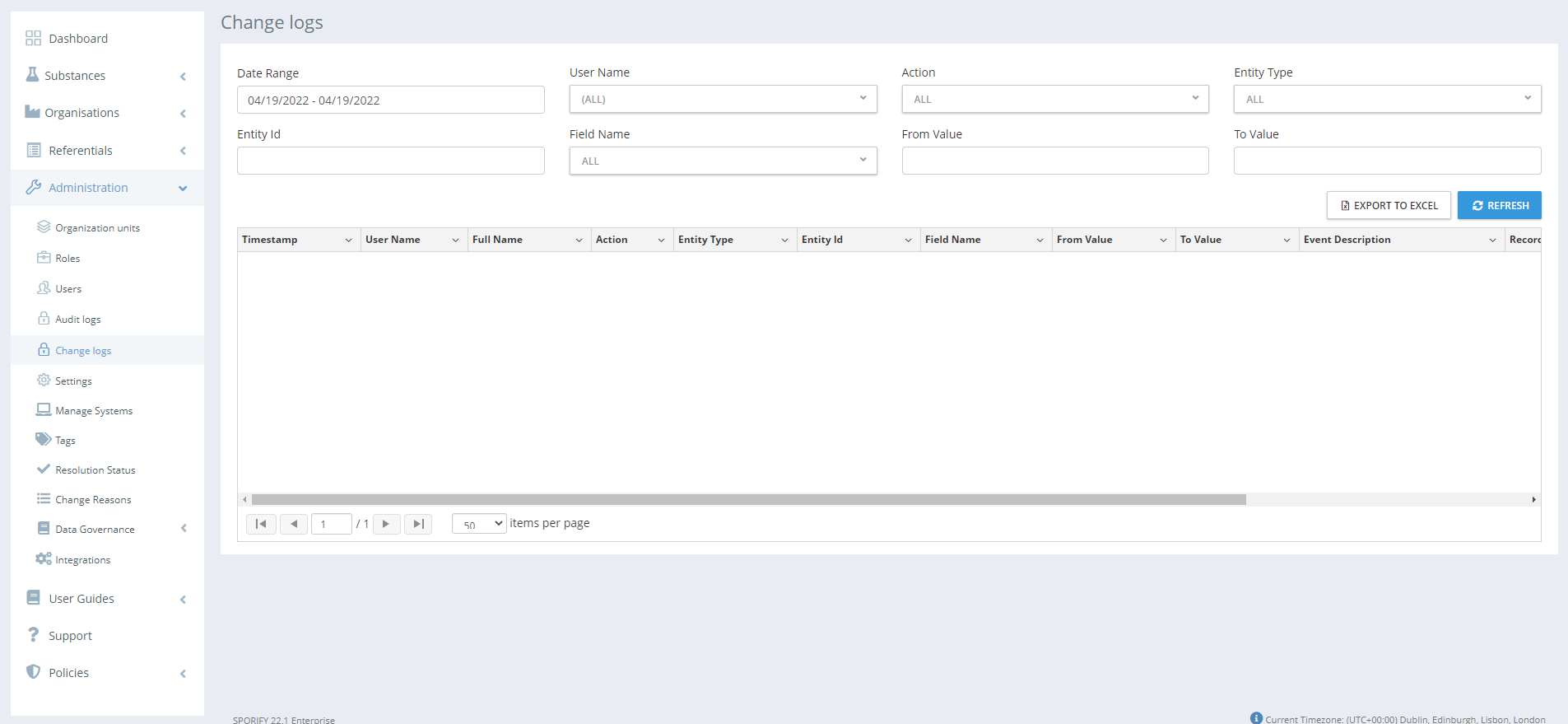
GUI Elements
|
Mockup of GUI Element |
Title |
Default |
Enabled |
Type |
Data |
Description |
|---|---|---|---|---|---|---|

|
Date Range |
Current Date
|
Always
|
Drop-down menu
|
String |
Here, the administrator can select a date range to filter by.
|

|
From Value |
Empty |
Always |
Textbox |
String |
Here, the administrator can insert a from value to filter by. |

|
To Value |
Empty |
Always |
Textbox |
String |
Here, the administrator can insert a to value to filter by. |

|
Username |
(ALL) |
Always |
Drop-down menu |
String |
Here, the administrator can select a username to filter by. |

|
Action |
ALL |
Always |
Drop-down menu |
String |
Here, the administrator can select an action to filter by. |

|
Entity Type |
ALL |
Always |
Drop-down menu |
String |
Here, the administrator can select an entity type to filter by. |

|
Field Name |
ALL |
Always |
Drop-down menu |
String |
Here, the administrator can select a field name to filter by. |
Available Actions And Commands
|
Mockup of GUI Element |
Title |
Shortcut |
Enabled |
Type |
Role/Permission |
Action |
Tooltip |
Audit Trail |
|---|---|---|---|---|---|---|---|---|
|
Export to Excel |
N/A |
Always |
Button |
Administration - Change Logs |
Exports Change Logs to Excel, downloading directly to the user’s device |
N/A |
Yes |
|
Refresh |
N/A
|
Always
|
Button
|
Administration - Change Logs |
Refreshes Change Logs screen
|
N/A
|
No
|
Related Documentation and Sources
N/A