
Description
In SPORIFY, the user can access a details page for each target Referentials term. The following information is provided on this details page:
-
Term Details
-
Term Id
-
Created
-
Modified
-
Version
-
Status
-
Description
-
Domain
-
Data Classification
-
Term List
-
-
Term Names
-
Language
-
Term Name
-
Short Name
-
Symbol
-
-
Term Mappings
-
Source Term Id
-
Source of Information
-
Status
-
Version
-
-
SPORIFY Matches
-
Source List Name
-
Source Term
-
Resolution Status
-
Updated
-
Procedure
-
Login to SPORIFY.
-
Select Referentials.
-
Click Term View.
-
Click on the relevant term link in the Term Name column.
-
To navigate back to the term list, click on the Term List link in the Term Details section.
-
Use the Language drop-down menu in the Term Names section to select a specific language.
-
Click on the Source of Information link in the Term Mappings section for further information.
-
Tags can also be added in this area by clicking Add Tag and selecting the desired tags.
Acceptance Criteria
To succeed, the user must be able to access a details page for each Referentials target term.
-
Verify that the details page contains three sections: Term Details, Term Names, Term Mappings and SPORIFY Matches.
Related / Alternative Procedure
N/A
GUI Specification
Purpose of this screen.
The purpose of the Referentials term detail screen is to provide further information about a given target term.
Mockups and Screenshots
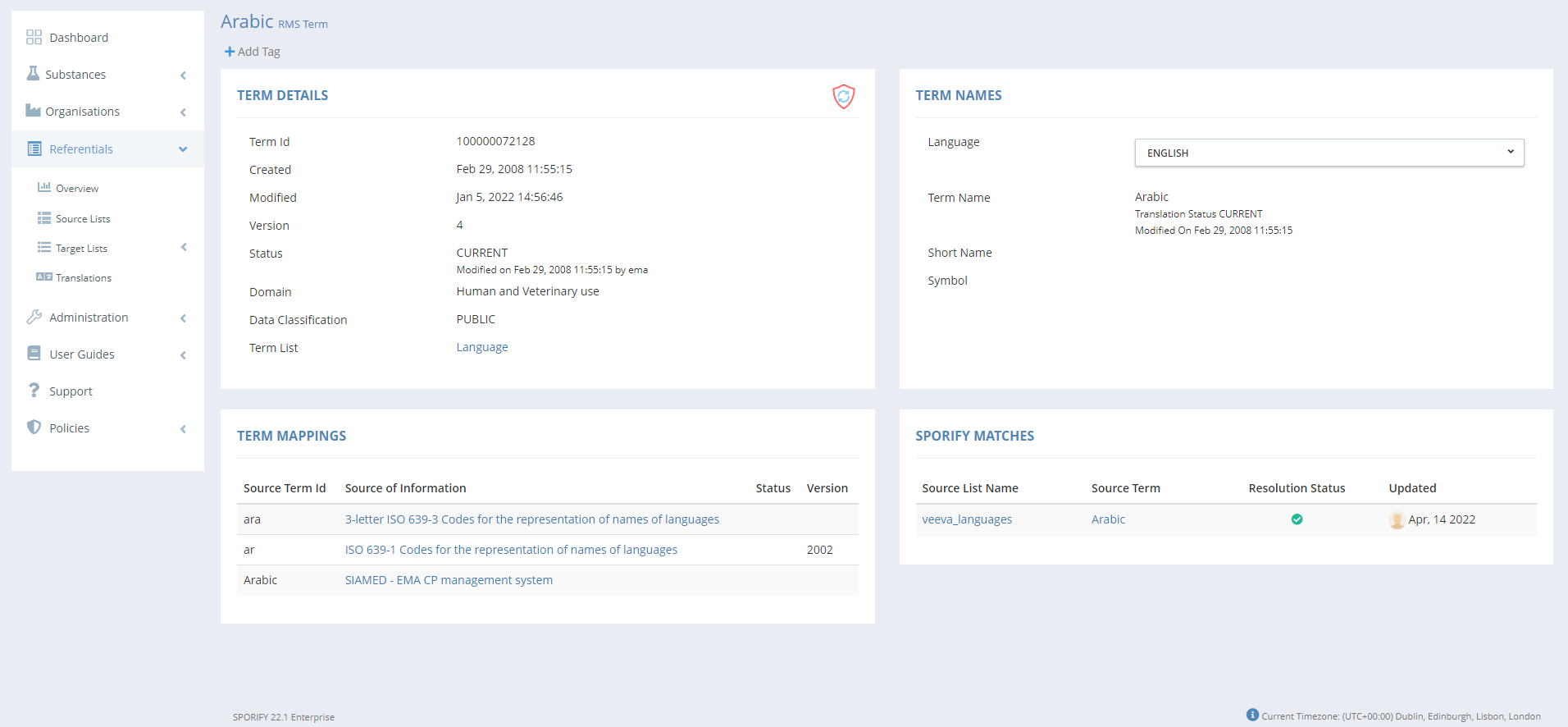
GUI Elements
|
Mockup of GUI Element |
Title |
Default |
Enabled |
Type |
Data |
Description |
|---|---|---|---|---|---|---|

|
Language |
ENGLISH |
Always |
Drop-down menu |
String |
Select term langauge |
Available Actions And Commands
|
Mockup of GUI Element |
Title |
Shortcut |
Enabled |
Type |
Role/Permission |
Action |
Tooltip |
Audit Trail |
|---|---|---|---|---|---|---|---|---|
|
N/A |
N/A |
N/A |
N/A |
N/A |
N/A |
N/A |
N/A |
N/A |
Related Documentation and Sources
-
N/A