
Description
In SPORIFY, notifications are sent to reviewers and approvers during the data governance process.
-
Reviewers are notified when a record is ready to be reviewed.
-
Reviewers are notified when an approver has rejected a relevant record.
-
Notifications are hyperlinks which redirect users to the relevant details page.
Procedure
-
Login to SPORIFY.
-
To view received notification previews, click on the Notifications (bell) icon at the top of the screen.
-
To view all received notifications, navigate to the Notifications screen by clicking ‘See all notifications’.
-
When a data governance notification is selected, the user is navigated to the relevant record’s details screen.
-
When a given record is pending review, the relevant reviewer will receive a notification saying that ‘Governance: [Record Domain]: [Record Number] is ready to review'.
-
When a given record is pending approval, the relevant approver will receive a notification saying that ‘Governance: [Record Domain]: [Record Number] is ready to approve’.
-
When a given record has been rejected by an approver, the relevant reviewer will receive a notification saying that ‘Governance: [Record Domain]: [Record Number] is rejected and ready to review again’.
-
When a sync occurs and data governance statuses change, the user will receive a notification.
-
Users receive summary notifications which are accessed by clicking the bell icon at the top right-hand side of the screen.
-
Users are redirected to the relevant source list page when they get summary notifications.
-
-
Click on a notification hyperlink to navigate to the relevant details page.
Acceptance Criteria
We succeed only if notifications related to the data governance process are available in SPORIFY.
-
Verify that reviewers are notified when a record is ready to be reviewed.
-
Verify that approvers are notified when a record is ready to be approved.
-
Verify that reviewers are notified when an approver has rejected a relevant record.
-
Verify that clicking on a notification navigates the user to the relevant details page.
Related / Alternative Procedure
N/A
GUI Specification
Purpose of these GUI elements
The purpose of these GUI elements is to enable data governance notifications in SPORIFY.
Mockups and Screenshots
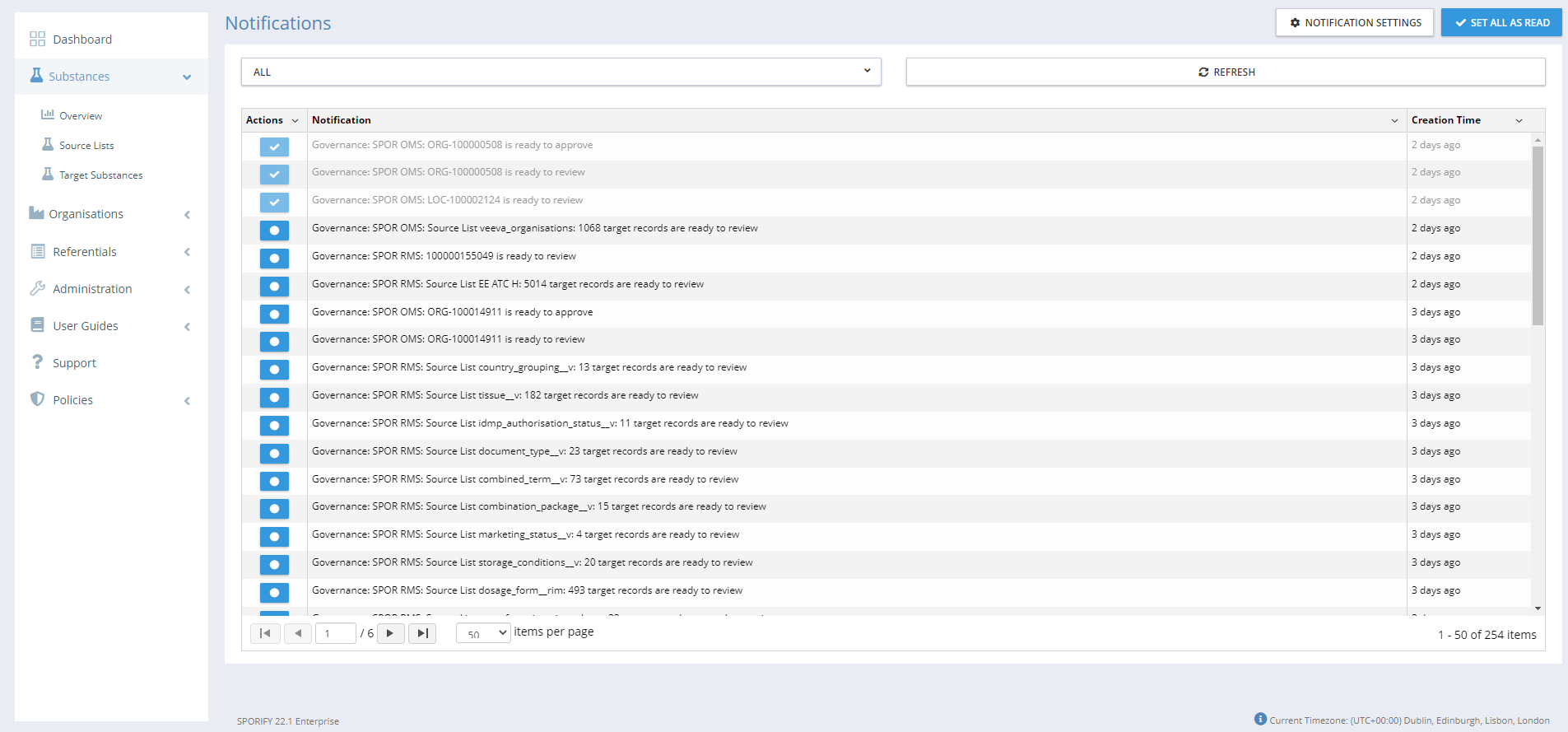
-20220225-124501.png?cb=0a25aa84ad478cc70def1eaadabc9f25)
-20220225-135435.png?cb=5eac1bb669812b87785a27ce26597a0b)
GUI Elements
|
Mockup of GUI Element |
Title |
Default |
Enabled |
Type |
Data |
Description |
|---|---|---|---|---|---|---|
|
N/A |
N/A |
N/A |
N/A |
N/A |
N/A |
N/A |
Available Actions And Commands
|
Mockup of GUI Element |
Title |
Shortcut |
Enabled |
Type |
Role/Permission |
Action |
Tooltip |
Audit Trail |
|---|---|---|---|---|---|---|---|---|

|
Notifications |
N/A |
Always |
Button/Icon |
Any |
Presents notifications preview |
N/A |
No |

|
See all notifications |
N/A |
Always |
Button |
Any |
Navigates to the Notifications screen |
N/A |
No |
Related Documentation and Sources
-
https://corritltd.visualstudio.com/Sporify/_boards/board/t/Sporify Team/Stories/?workitem=4357
-
https://corritltd.visualstudio.com/Sporify/_boards/board/t/Sporify Team/Stories/?workitem=4346
-
https://corritltd.visualstudio.com/Sporify/_boards/board/t/Sporify Team/Stories/?workitem=4239